Mini-Box Installation Guide
How to mount the Evercam Mini-Box and set the camera view. Keep this page with the unit; complete the final steps with Evercam Support over the phone.
Step 1 — Mount the unit
Mounting the Mini-Box
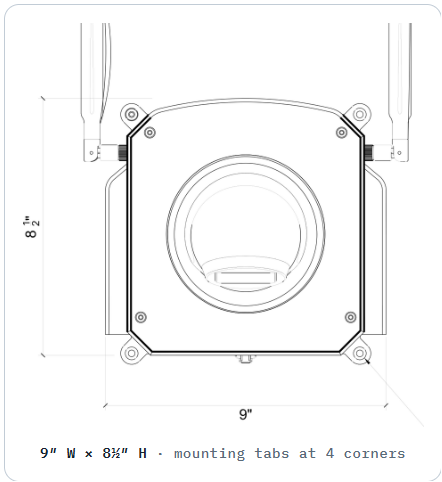
9″ W × 8½″ H · mounting tabs at 4 corners
Weight 5½ lb Power 12 W / 1 A · Placement Indoor only
Choose your fasteners. Mount the Mini-Box using the appropriate fasteners for your installation scenario — typically 4 places.
Magnetic mount? If magnetic mounting was the chosen option, your Mini-Box arrived with the magnets already in place.
Secure all four corners through the mounting tabs, keeping the enclosure flush against the surface.
Warning
Use pan head or button head screws only. Do not use countersink screws.
Only tighten until snug. Over-tightening may crack the enclosure.
Step 2 — Aim the camera
Setting & adjusting the camera view
Remove the dome cover. Twist the white ring off by hand.
Loosen the clamp screw.
Rotate & tilt the camera to obtain the desired view.
Confirm the view with Evercam Support. Call 347-632-8046 to verify framing before you lock it in.
Tighten the clamp screw.
Replace the dome cover.
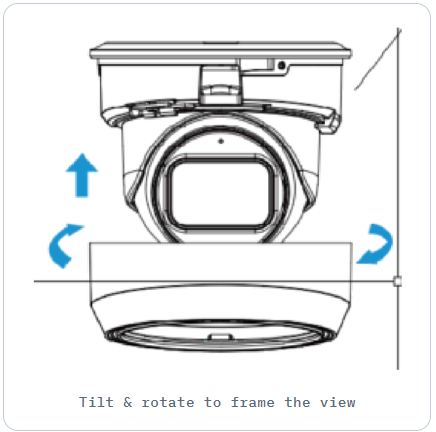
Tilt & rotate to frame the view
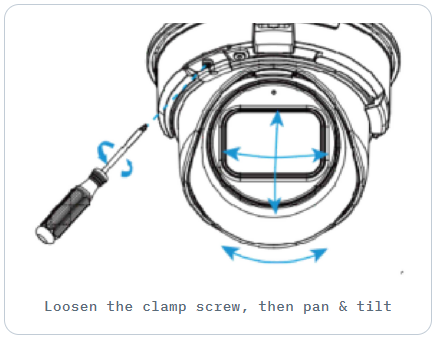
Loosen the clamp screw, then pan & tilt
Step 3 — Finish
Completing the installation
To complete the installation, contact Evercam Support. The team will work with you remotely to confirm connectivity, recordings, and the camera view.
Phone 347-632-8046
Email support@evercam.com